
Connect Klaviyo to MirrorNex
MirrorNex uses Klaviyo to send email campaigns. You'll need to connect your Klaviyo account before you can create and send campaigns.
You need a Klaviyo account to use MirrorNex campaigns. If you don't have one, sign up for Klaviyo first — they offer a free tier for small lists.
Why Klaviyo?
Klaviyo is the email platform most Shopify fashion stores already use. By integrating with Klaviyo, MirrorNex can:
- Send professional, branded emails at scale
- Leverage your existing Klaviyo segments and lists
- Track deliverability, opens, and clicks accurately
- Comply with email marketing regulations (CAN-SPAM, GDPR)
How to connect Klaviyo
Step 1: Open the Campaigns page
In your Shopify admin, go to Apps → MirrorNex and click Campaigns in the navigation.
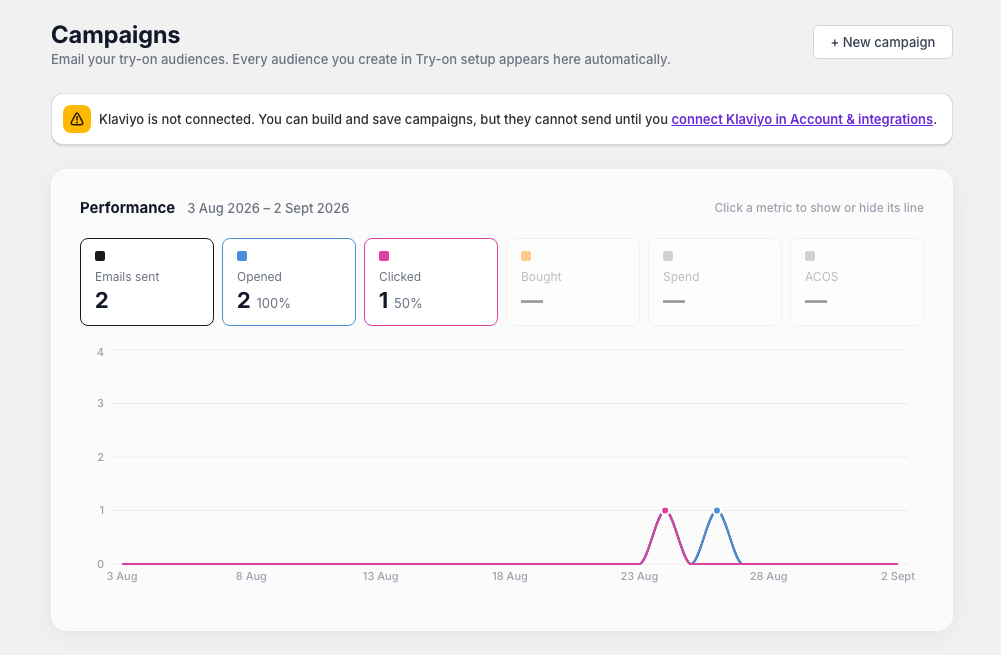
If Klaviyo isn't connected, you'll see a warning banner at the top of the page:
"Klaviyo integration required. Connect your Klaviyo account to start sending campaigns."
Step 2: Click Connect Klaviyo
Click the Connect Klaviyo button in the warning banner. This will open the Klaviyo authorization flow.
Step 3: Authorize MirrorNex
Log in to your Klaviyo account (if not already logged in) and authorize MirrorNex to:
- Send emails on your behalf
- Access your lists and segments
- Track campaign performance metrics
Step 4: Confirm connection
Once authorized, you'll be redirected back to MirrorNex. The warning banner will disappear, and you can now create campaigns.
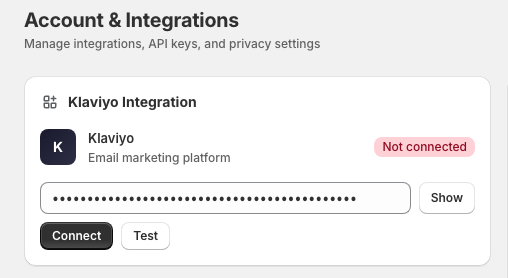
Connection status
You can verify your Klaviyo connection status anytime:
- Connected: No warning banner on Campaigns page
- Not connected: Yellow warning banner appears
Troubleshooting
Authorization failed
If the authorization fails:
- Make sure you're logged into the correct Klaviyo account
- Check that your Klaviyo account has permission to authorize apps
- Try disconnecting and reconnecting
Need a different Klaviyo account?
To switch to a different Klaviyo account, contact support@mirrornex.io to disconnect the current integration, then reconnect with the new account.
Once connected, you're ready to create your first campaign.