
Managing Your Campaigns
Once you've created campaigns, you can duplicate successful ones, delete old campaigns, and keep your campaigns organized by audience.
Viewing your campaigns
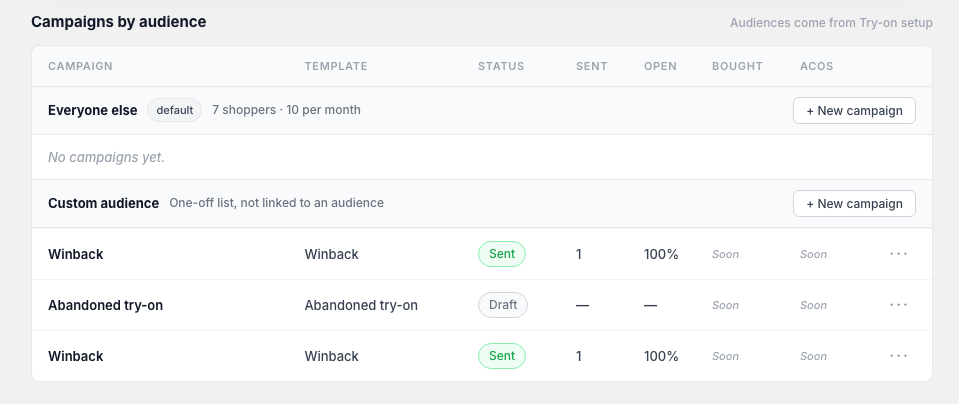
Go to Apps → MirrorNex → Campaigns to see all your campaigns. Campaigns are automatically grouped by the audience (try-on rule) they target, making it easy to see which campaigns are running for each customer segment.
Campaign actions
Each campaign has a menu with available actions:
Duplicate a campaign
Create a copy of an existing campaign to use as a starting point:
- Find the campaign you want to duplicate
- Click the ⋮ (more actions) menu
- Select Duplicate
- A copy is created with "(Copy)" appended to the name
- Edit the duplicated campaign as needed
Duplicating is great when you want to A/B test different subject lines or content, run a similar campaign to a different audience, or create a recurring campaign series.
Delete a campaign
Remove campaigns you no longer need:
- Find the campaign you want to delete
- Click the ⋮ (more actions) menu
- Select Delete
- Confirm the deletion
Deleted campaigns cannot be recovered. Their performance data is also removed. Consider keeping sent campaigns for historical reporting.
Campaigns grouped by audience
Campaigns are organized under the audience (try-on rule) they target. This helps you:
- See all campaigns for a specific customer segment
- Compare performance across similar audiences
- Plan campaigns strategically by audience
Campaign statuses
Campaigns can have different statuses:
- Draft — Saved but not yet scheduled or sent
- Scheduled — Set to send at a future date/time
- Sent — Already delivered to recipients
- Sending — Currently being delivered
Best practices
- Keep successful campaigns — Don't delete high-performing campaigns; duplicate them instead
- Use clear naming — Name campaigns descriptively so you can find them later (e.g., "Summer Collection - VIP Customers - June")
- Review performance — Before duplicating, check campaign performance to understand what worked
- Clean up drafts — Periodically delete draft campaigns you're not going to use