
Understanding Customer Details
Click on any customer in the Style Profiles list to view their full profile. The customer detail page gives you comprehensive insights into their try-on behavior and preferences.
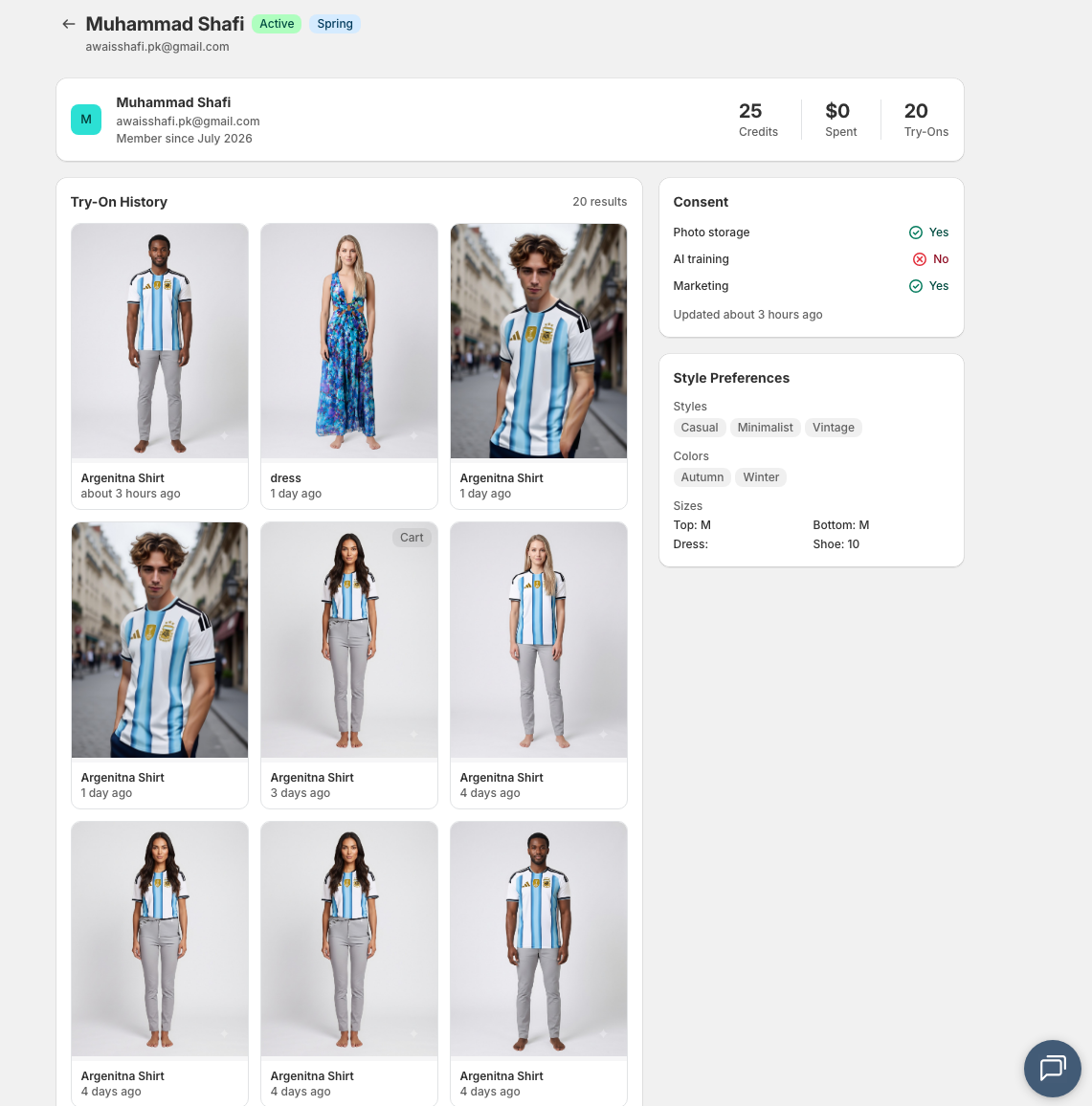
Profile overview
At the top of the page, you'll see the customer's basic profile information:
- Name — Customer's full name
- Email — Contact email address
- Member since — When they first used try-on
- Size — Their preferred size (if saved)
Customer stats
Quick metrics showing the customer's engagement:
Try-ons left
The number of try-ons available in their account for the current billing cycle, based on their audience group allowance.
Spent
Total amount the customer has spent on purchases after using try-on. This helps identify high-value customers.
Try-Ons
Total number of try-ons the customer has completed. High try-on counts indicate engaged customers.
Try-on history
A visual grid showing all the try-on results this customer has generated:
- View the result images from each try-on
- See which products they tried
- Track when each try-on occurred
This history helps you understand the customer's interests and style preferences.
Consent status
Shows the customer's privacy and data consent choices:
Photo Storage
Whether the customer has consented to saving their try-on photos in Style Room (My Looks).
Marketing
Whether the customer has opted in to receive marketing emails from your store.
Customers can update their consent preferences or delete saved looks at any time in Style Room (My Looks).
Style preferences
Insights into the customer's fashion preferences, captured from their try-on behavior and saved selections:
Styles
Fashion styles the customer gravitates toward (e.g., Casual, Formal, Streetwear).
Body Type
Body type preferences explicitly chosen by the shopper to improve try-on accuracy.
Colours
Color preferences based on products they've tried or explicitly selected.
Occasions
Shopping occasions they're interested in (e.g., Work, Weekend, Special Events).
Sizes
Size preferences across different product categories.
Using customer insights
Customer detail data helps you:
- Personalize campaigns — Target customers based on their style preferences
- Identify trends — See what products and styles are popular
- Improve recommendations — Understand what customers are looking for
- Respect privacy — Ensure you're honoring consent preferences