
How to add the Style Room to your store
The Style Room is automatically available once MirrorNex is installed. You just need to add the link to your store's navigation so customers can access it.
Your Style Room link
Your Style Room is accessible at this URL:
/apps/mirrornex/portalYou'll find this link in the MirrorNex dashboard under the "Finish setup" banner.
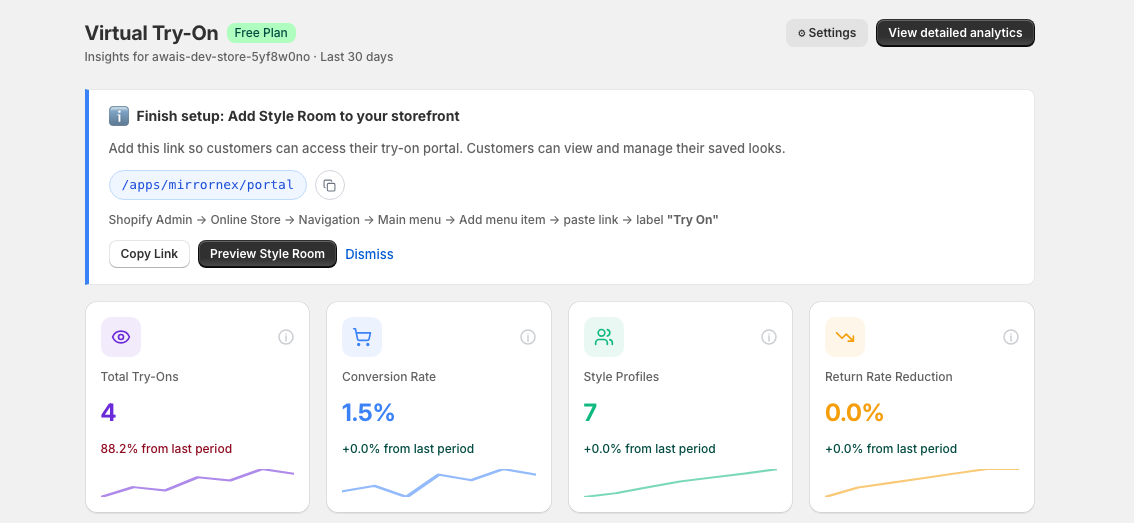
Step-by-step: Add to your navigation
Follow these steps to add the Style Room to your store menu:
Go to Shopify Admin
Open your Shopify admin dashboard.
Navigate to Online Store → Navigation
In the left sidebar, click Online Store, then click Navigation.
Select your Main menu
Click on Main menu (or whichever menu you want to add the link to).
Add menu item
Click Add menu item.
Enter the details
- Name: Enter a label like "Try On" or "Style Room"
- Link: Paste
/apps/mirrornex/portal
Save the menu
Click Save menu to apply your changes.
Quick actions in MirrorNex
From the MirrorNex dashboard, you can:
- Copy Link — Copy the Style Room URL to your clipboard
- Preview Style Room — See how the Style Room looks on your store
- Dismiss — Hide the setup banner once you've added the link
Where else to add the link
Besides the main navigation, consider adding the Style Room link to:
- Footer menu — For easy access from any page
- Homepage banner — Feature it prominently for new visitors
- Product pages — Add a "View My Saved Looks" link
- Email campaigns — Drive customers back to their saved try-ons
Suggested link names
Choose a label that fits your brand:
- "Try On"
- "Style Room"
- "Virtual Fitting Room"
- "My Looks"
- "Try Before You Buy"